Skip to content
whitebackground
Editor
Tools ⌄
Product photo white backgroundsBulk background removalAdd white to transparent PNGTransparent product imagesSquare product photosResize product imagesRefine product photo edgesPlain white backgroundsAmazon main image editorShopify image resizerEtsy listing photo framingeBay listing photo sizeProduct photo enhancerPricing & plansQuestions & answersHow it worksSign in
How it worksFeaturesPricingFAQ
Sign inStart free
Home/eBay listing photo size

FREE SINGLE PHOTOS · NO SIGN-UP · NO WATERMARK

eBay Photo Size Tool for Clear Listing Images

Show the item you are actually selling. Keep scuffs and included accessories visible while adjusting the frame. Choose optional background removal before uploading if the scene needs cleaning up.

On your device FREE

On your device. No AI processing needed.

Upload filesor paste
No photo handy?
Try a sample — always free.

Your photo stays on your device. No AI model download needed.

Quick processing keeps photos on your device. Background removal downloads an AI model only when needed (about 220 MB). Public URL imports depend on the image host allowing browser access.

SEE WHAT CHANGES

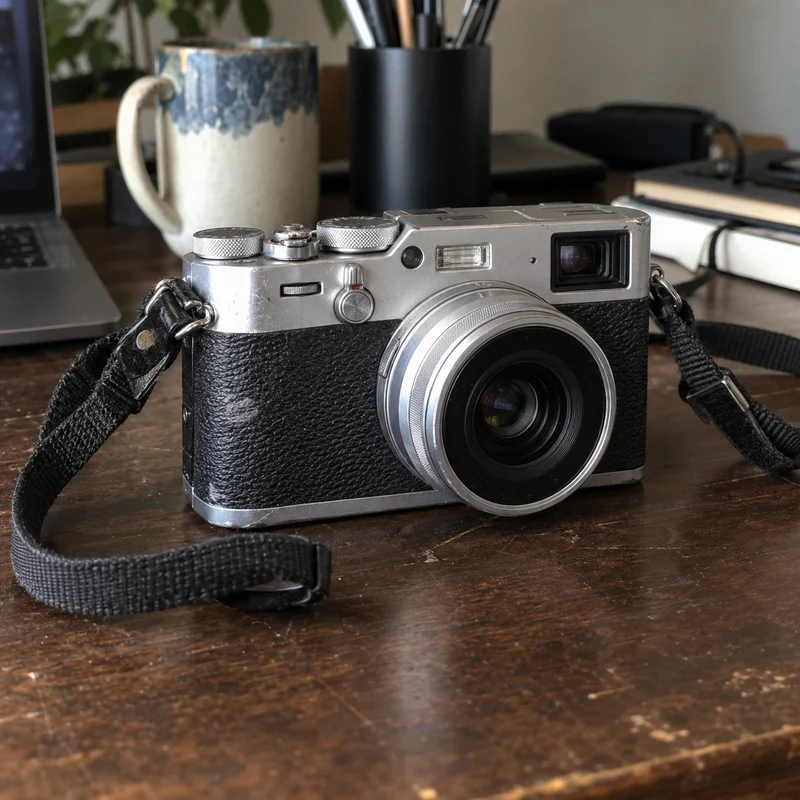
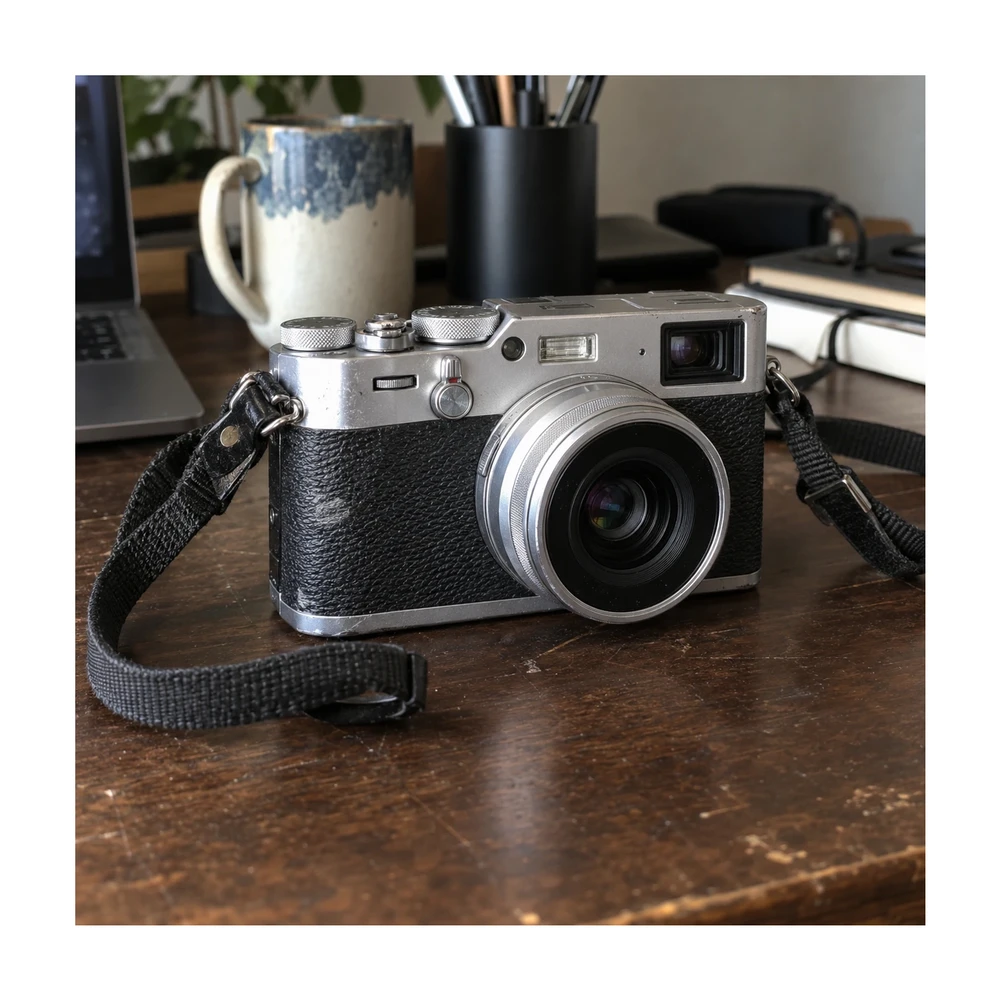
A clearer backdrop, the same honest item condition

Preparing eBay photo size should help buyers inspect the item. Keep visible scratches, signs of use and included parts accurate when you simplify the background.

Original secondhand-item photoUsed silver camera with visible wear and its strap on a desk
Resized with white paddingThe full camera photograph resized with white padding and its visible condition preserved
Actual browser export with the entire original photo preserved. Enable background removal before uploading if you also want a cutout on white.

Example source photos were created for this tool. Results shown here were processed with the local browser engine; inspect your own result before using it.

MADE FOR THE WAY YOU WORK

Where ebay listing photo size can help

↗

Photograph a secondhand item at home

A desk or shelf can add clutter around the item you are selling. Simplify the backdrop while preserving the real product condition, then add separate detail photographs for scratches, ports, serial labels or accessories relevant to the buyer.
↗

Prepare consistent views of one item

Front, rear and side photos can share a canvas shape and background. Keep their angles and content accurate, and make sure no part is cut off. A clean main image should still be supported by enough views to explain the item.

↗

Review an older listing photo

Start with the original file if available, rather than a small screenshot of a listing. Check actual output dimensions and visible condition. Resizing cannot restore detail that was absent in a compressed or blurry source.

Need a larger source first? Compare a separate 2× result with the product photo enhancer. Check labels, logos and textures before bringing the result into this editor.

Keep straps and small edges with the edge touch-up editor while preserving the item condition.

For several views of your stock, try batch background removal and review every result.

FROM INPUT TO DOWNLOAD

How to prepare your eBay listing photo

  1. 01

    Choose a truthful source photo

    Use a sharp image of the exact item being sold, including the accessories shown in that view. This page selects the eBay preset and starts with an opaque white output.

  2. 02

    Choose your background treatment

    Use Quick processing and review the resulting outline. The editor separates the product from the setting; inspect any mixed edges around straps, cables or reflective surfaces before making a correction.

  3. 03

    Check framing and actual dimensions

    The eBay preset targets a 1600 × 1600 px square with adjustable fill. A small original is not enlarged to reach it. Read the actual size and check that protruding parts remain inside the canvas.

  4. 04

    Download and inspect the listing preview

    Save the photo, add it to your listing and review the displayed crop. Keep visible wear and additional condition photos accurate. Check the current eBay guidance for the listing rather than relying only on the preset name.

BEFORE YOU DOWNLOAD

A result you can check yourself

  • ✓The image shows the exact item and included accessories.
  • ✓Visible wear has not been hidden or edited away.
  • ✓Straps, cables and protruding parts remain in frame.
  • ✓Actual export size and the displayed listing crop have been checked.

Listing rules can change. eBay’s photo guidance for listings ↗

Try the tool above ↑

A FEW USEFUL ANSWERS

eBay listing photo size FAQ

What eBay photo size does the preset use?

It targets a 1600 × 1600 px square. You can switch to Custom for another canvas. The tool does not enlarge a small original, so the actual exported size can be smaller than the preset target.

Will a white background guarantee listing approval?

No. The editor prepares the background, framing and pixel dimensions. It does not evaluate every listing rule, category, item restriction or image-content requirement. Review current eBay guidance and inspect the actual uploaded image.

Should I remove scratches from a used item?

Keep the item condition accurate. Use the background brush to correct the separation from the setting, rather than conceal damage or signs of use. Additional close-up photographs can help buyers understand condition.

Can I keep all the original photo and add padding?

Yes. Use the product image resizer with background removal unchecked. It fits the whole original proportionately inside a new canvas. This page also keeps the original scene by default; enable background removal before upload for an isolated product image.

Can I prepare several views of the item together?

Pro can process up to 100 photos with shared output settings and a ZIP download. Review each angle separately: a cable visible in one view or a small accessory in another may need different framing or a manual touch-up.

Will this sharpen an old or low-resolution photo?

No. The tool does not invent resolution or enlarge the subject beyond its source size. Use a larger original or take a new photograph when buyers need detail that the old file cannot show.

THE NEXT PART OF YOUR WORKFLOW

Explore other tools

Choose the task you need next. Each tool opens with its own settings and examples.

Resize product images

Resize product images to custom dimensions with white padding. Preview framing, keep the product proportionate and download a JPG or PNG in your browser.

Open tool ↗

Product photo white backgrounds

Make a white background for product photos online. Remove a busy backdrop, check product details and download a JPG or PNG free, without a watermark.

Open tool ↗

Refine product photo edges

Use a free white background photo editor with Erase, Restore, Undo and Redo. Touch up leftover background, recover details and export a JPG or PNG.

Open tool ↗

Square product photos

Make an image square with white padding around the product. Keep handles and edges in frame, adjust the product fill and download a JPG or PNG free.

Open tool ↗

Amazon main image editor

Prepare an Amazon main image with a pure white backdrop and adjustable product framing. Check output size and edges, then download a JPG or PNG.

Open tool ↗

Bulk background removal

Remove backgrounds from up to 100 product photos with Pro. Apply shared framing, review each result and download a ZIP. Try a single photo free.

Open tool ↗

Need the whole workflow? Read how to make a photo background white.

READY WHEN YOU ARE

Prepare my eBay listing photo

One photo, a clearer result. Free with Quick processing, with no sign-up or watermark.

Prepare my eBay photo — free ↑

WE'RE HERE TO HELP

Need help with
a product photo?

Questions about an edit, a plan or a download? Get in touch.

Send us a message

Tell us what you were trying to make.

support@whitebackground.app ↗Contact & support
whitebackground

A little less background.
A lot more focus on your photo.

support@whitebackground.app

MAKE SOMETHING CLEARMake background whiteProduct photo enhancerProduct photo white backgroundsBulk background removalAdd white to transparent PNGTransparent product imagesSquare product photosResize product imagesRefine product photo edgesPlain white backgroundsAmazon main image editorShopify image resizerEtsy listing photo framingeBay listing photo sizePricing
THE DETAILSAboutContactPrivacy policyTerms of serviceRefund policyDisclaimerLicenses & acknowledgments

© 2026 WhiteBackground.app

WhiteBackground.app is an independent tool and is not affiliated with Amazon, Walmart, Shopify, Etsy or eBay.